Summarize with AI

The brand a founder builds before breakfast 

A founder with no design budget and a launch date needs a logo that looks professional by this afternoon, not after a weeks long back and forth with a designer. An AI logo generator app exists to close that gap. This guide covers the architecture, cost, and timeline behind building one that actually produces something a founder wants to use. 

What an AI Logo Generator App Actually Does 

An AI logo generator app takes a short description of a brand and its style preferences, then produces logo options a user can preview, adjust, and export. Adoption is real and growing fast. The AI logo generator market is projected to reach about 730 million dollars in 2026, growing at roughly 23 percent a year, according to 2026 market research. An estimated 40 percent of small businesses already use some form of AI for their visual branding, with AI tools cutting typical logo turnaround time by up to half. The app itself mainly handles the guided input flow and the generation step that turns a description into visual options. It also handles the editing layer that lets a result move from a rough first pass to something worth actually publishing. None of this requires the app to replace a human designer's judgment. It requires giving a user enough control that the AI output feels like a starting point they shaped, not a slot machine result they either accept or reject. 

Young founder adjusting AI-generated logo shapes on a drawing tablet

Three Approaches to Building a Logo Tool 

Not every logo tool solves the uniqueness problem the same way, and three approaches cover most of what gets built. 

Approach 

Best for 

Tradeoff 

Template based logo maker 

Fast, predictable results from proven layouts 

The same layouts get reused across many brands, which weakens uniqueness 

AI generative with human refinement 

Fast, distinctive starting points with real creative control 

Raw AI output quality varies, and needs strong editing tools to become publishable 

Full custom design service 

The most tailored result to a brand's actual strategy 

Slowest and most expensive option, out of reach for many early stage founders 

Brandly sits in the second row. It generates logo options from a brand description and style preferences. From there, a user can preview multiple variations, adjust colors and layout, and refine the result over time rather than accepting the first output as final. That middle position was a deliberate choice, not a compromise between the other two. 

Choosing the approach shapes the entire build: 

  • Choose a template based maker when speed and predictability matter more than uniqueness, and budget less time for generation logic and more for a clean template library 

  • Choose AI generative with refinement when a user needs a result that feels genuinely theirs, and invest real design time in the editing tools that get output from rough to finished 

  • Choose a full custom service only when brand strategy depth matters more than speed or cost, since that path does not scale the way a self serve app does 

Most teams treat the generation step as the hard part and the editing tools as an afterthought. In practice, the editing layer is what decides whether a user ever actually downloads and uses what gets generated. 

How to Scope the First Version 

Most AI logo generator apps fail on the gap between a raw AI output and something a user is actually willing to publish under their own brand name. A first version with fewer style options but real editing depth beats one with more styles and no way to fix what comes out wrong. 

  • Design the guided input flow around brand description and style preference, the way Brandly turns those two inputs into logo options instantly rather than asking for a long form brief 

  • Build real editing tools for color and layout from the start, since Brandly's users adjust and refine results rather than treating the first generation as final 

  • Support the export formats a brand actually needs, since Brandly's logos work across websites, social profiles, business cards, and print, not just one preview size 

Teams that ship strong generation and weak editing tools usually discover users generate dozens of options and download none of them. The gap between generating and finishing is where most first versions actually fail. 

What a Realistic Build Timeline Looks Like 

Brandly shipped in one month, the fastest build in this entire series, and four compressed stages made up that window. 

  • Discovery and scope, where the team locks the input flow, the AI generation approach, and the editing feature set before any screen gets designed 

  • Core build, the largest block on the calendar even at this pace, where the input flow, generation pipeline, and editing tools come together against that locked scope 

  • Output quality testing, run across a wide range of real brand descriptions and styles, not a handful of best case examples chosen to look good in a demo 

  • Launch and monitor, the first weeks live, when real usage tests whether generated output holds up in quality and variety outside a curated test set 

Skipping broad output quality testing is the most common reason a generator that looked great on a few demo prompts starts producing flat or repetitive results. That happens once real users describe brands the team never tried during development. 

Diverse product team reviewing AI branding tool wireframes in industrial studio
Designer hands arranging Pantone colour chips in deliberate branding groupings

What Moves the Budget and Timeline 

These factors move the budget on an AI logo generator app more than anything else in the brief: 

  • Generation model choice, since AI image generation pricing in 2026 ranges from about 0.005 to 0.20 dollars per image depending on the model tier, and that choice affects both output quality and unit cost 

  • Editing tool depth, since color, layout, and variation controls take real design and engineering work well beyond a simple regenerate button 

  • Export format range, since supporting web, social, and print ready files each come with their own resolution and file format requirements 

  • Guided input design, since translating a vague brand description into parameters a generation model can actually use is a real product problem, not just a text box 

A basic AI powered app in this category typically runs from about 10,000 to 40,000 dollars, according to 2026 AI app development pricing guides. Cost rises quickly once a premium generation model or deeper editing suite gets added. 

What This Costs Beyond the Build Fee 

The build fee covers the app. Every logo generated afterward carries a real, per use cost that a template based tool never has to think about. 

  • AI generation API costs, since every image a user generates costs money at whatever per image rate the chosen model charges, and that cost scales directly with how many logos get generated 

  • Storage and export infrastructure, for saving a user's history of variations and producing high resolution files across the export formats the app supports 

  • Model version maintenance, since generation providers update and retire model versions over time, and output quality or style can shift when that happens 

  • Uniqueness and trademark awareness, since AI models can produce visually similar results for different users, which is worth building light originality checks around rather than assuming every output is automatically distinct 

Generation cost is the one expense that grows precisely when the app succeeds. A viral spike in new users is also a spike in per image API charges, which needs to be priced into the product from the start rather than discovered after a surprising bill. 
Coloured marker pens and abstract letterform beside open sketchbook

Where These Apps Break in Production 

The generation step itself rarely fails outright. The gap between what gets generated and what a user can actually use does. 

  • Generic feeling output, since a model that produces technically fine but visually similar results across many different brand descriptions quietly undermines the entire point of a custom logo 

  • Editing tools that do not go far enough, since a user who gets ninety percent of the way to a usable logo but cannot fix the last small detail often abandons the result entirely 

  • Export files that do not match real world needs, since a logo that looks great as a preview but exports poorly for print or a specific social size creates a bad surprise 

  • Uniqueness risk treated as someone else's problem, since two different users can end up with visually similar logos from the same model, and a shipped app benefits from flagging that possibility 

  • The honest framing here is that a generated logo is a strong, fast starting point for a brand, not a guarantee of legal uniqueness the way a trademark search would confirm 

None of this shows up in a demo built around a handful of prompts the team already knows produce a great result. It shows up once real users describe brands the model has never seen phrased quite that way. It also shows up once enough people are using the app that generation cost and output variety both get tested at real scale. 

The Logo Tool We Have Shipped 

Neon Apps built Brandly around exactly this fast, AI generative with real editing control model. 

Project 

Client 

Year 

Build time 

What it solved 

Brandly 

Focus Studios 

2025 

1 month 

AI generated, editable brand logos ready in seconds 

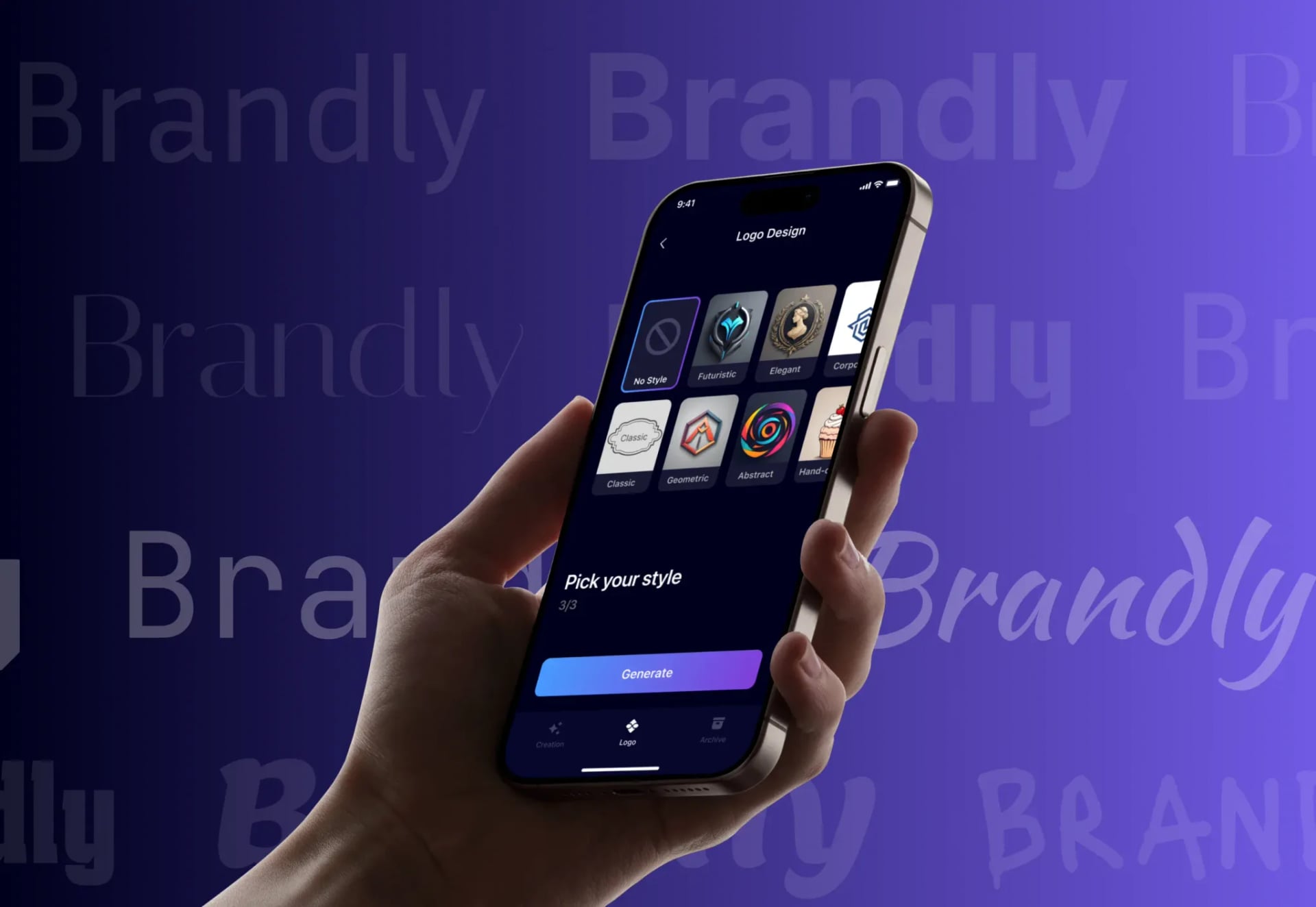
Brandly gives entrepreneurs, creators, and small businesses a way to build a professional brand image without hiring a designer. A user describes their brand and picks style preferences, then gets logo options instantly through a guided flow that stays clean and direct enough to try several ideas quickly. From there, a user can preview multiple variations, adjust colors or layout, and download high resolution files that work across websites, social profiles, business cards, and print materials. The app supports quick edits so a brand identity can keep evolving rather than locking in on day one. Brandly became a popular tool for entrepreneurs and creators launching new projects, with users specifically valuing how fast they could reach a solid brand look without hiring a designer. Planning MVP development around a tight, single purpose input to output loop, rather than a broad creative suite, is what let this ship in a single month. The editing depth that makes the result usable never got cut to hit that timeline. 
related projects

FAQ

What is an AI logo generator app?

What does Neon Apps bring to an AI logo generator project?

Should an AI logo generator app aim for one perfect result or several options?

How does Neon Apps scope an AI logo generator project?

How long and how much does an AI logo generator app cost to build?

Stay Inspired

Get fresh design insights, articles, and resources delivered straight to your inbox.

Get stories, insights, and updates from the Neon Apps team straight to your inbox.

Latest Blogs

Stay Inspired

Get stories, insights, and updates from the Neon Apps team straight to your inbox.

Got a project?

Let's Connect

Got a project? We build world-class mobile and web apps for startups and global brands.

Contact

Email
support@neonapps.co

Whatsapp
+90 552 733 43 99

Address

New York Office : 31 Hudson Yards, 11th Floor 10065 New York / United States

Istanbul Office : Huzur Mah. Fazıl Kaftanoğlu Caddesi No:7 Kat:10 Sarıyer/Istanbul

© Copyright 2025. All Rights Reserved by Neon Apps

Summarize with AI

The brand a founder builds before breakfast 

A founder with no design budget and a launch date needs a logo that looks professional by this afternoon, not after a weeks long back and forth with a designer. An AI logo generator app exists to close that gap. This guide covers the architecture, cost, and timeline behind building one that actually produces something a founder wants to use. 

What an AI Logo Generator App Actually Does 

An AI logo generator app takes a short description of a brand and its style preferences, then produces logo options a user can preview, adjust, and export. Adoption is real and growing fast. The AI logo generator market is projected to reach about 730 million dollars in 2026, growing at roughly 23 percent a year, according to 2026 market research. An estimated 40 percent of small businesses already use some form of AI for their visual branding, with AI tools cutting typical logo turnaround time by up to half. The app itself mainly handles the guided input flow and the generation step that turns a description into visual options. It also handles the editing layer that lets a result move from a rough first pass to something worth actually publishing. None of this requires the app to replace a human designer's judgment. It requires giving a user enough control that the AI output feels like a starting point they shaped, not a slot machine result they either accept or reject. 

Young founder adjusting AI-generated logo shapes on a drawing tablet

Three Approaches to Building a Logo Tool 

Not every logo tool solves the uniqueness problem the same way, and three approaches cover most of what gets built. 

Approach 

Best for 

Tradeoff 

Template based logo maker 

Fast, predictable results from proven layouts 

The same layouts get reused across many brands, which weakens uniqueness 

AI generative with human refinement 

Fast, distinctive starting points with real creative control 

Raw AI output quality varies, and needs strong editing tools to become publishable 

Full custom design service 

The most tailored result to a brand's actual strategy 

Slowest and most expensive option, out of reach for many early stage founders 

Brandly sits in the second row. It generates logo options from a brand description and style preferences. From there, a user can preview multiple variations, adjust colors and layout, and refine the result over time rather than accepting the first output as final. That middle position was a deliberate choice, not a compromise between the other two. 

Choosing the approach shapes the entire build: 

  • Choose a template based maker when speed and predictability matter more than uniqueness, and budget less time for generation logic and more for a clean template library 

  • Choose AI generative with refinement when a user needs a result that feels genuinely theirs, and invest real design time in the editing tools that get output from rough to finished 

  • Choose a full custom service only when brand strategy depth matters more than speed or cost, since that path does not scale the way a self serve app does 

Most teams treat the generation step as the hard part and the editing tools as an afterthought. In practice, the editing layer is what decides whether a user ever actually downloads and uses what gets generated. 

How to Scope the First Version 

Most AI logo generator apps fail on the gap between a raw AI output and something a user is actually willing to publish under their own brand name. A first version with fewer style options but real editing depth beats one with more styles and no way to fix what comes out wrong. 

  • Design the guided input flow around brand description and style preference, the way Brandly turns those two inputs into logo options instantly rather than asking for a long form brief 

  • Build real editing tools for color and layout from the start, since Brandly's users adjust and refine results rather than treating the first generation as final 

  • Support the export formats a brand actually needs, since Brandly's logos work across websites, social profiles, business cards, and print, not just one preview size 

Teams that ship strong generation and weak editing tools usually discover users generate dozens of options and download none of them. The gap between generating and finishing is where most first versions actually fail. 

What a Realistic Build Timeline Looks Like 

Brandly shipped in one month, the fastest build in this entire series, and four compressed stages made up that window. 

  • Discovery and scope, where the team locks the input flow, the AI generation approach, and the editing feature set before any screen gets designed 

  • Core build, the largest block on the calendar even at this pace, where the input flow, generation pipeline, and editing tools come together against that locked scope 

  • Output quality testing, run across a wide range of real brand descriptions and styles, not a handful of best case examples chosen to look good in a demo 

  • Launch and monitor, the first weeks live, when real usage tests whether generated output holds up in quality and variety outside a curated test set 

Skipping broad output quality testing is the most common reason a generator that looked great on a few demo prompts starts producing flat or repetitive results. That happens once real users describe brands the team never tried during development. 

Diverse product team reviewing AI branding tool wireframes in industrial studio
Designer hands arranging Pantone colour chips in deliberate branding groupings

What Moves the Budget and Timeline 

These factors move the budget on an AI logo generator app more than anything else in the brief: 

  • Generation model choice, since AI image generation pricing in 2026 ranges from about 0.005 to 0.20 dollars per image depending on the model tier, and that choice affects both output quality and unit cost 

  • Editing tool depth, since color, layout, and variation controls take real design and engineering work well beyond a simple regenerate button 

  • Export format range, since supporting web, social, and print ready files each come with their own resolution and file format requirements 

  • Guided input design, since translating a vague brand description into parameters a generation model can actually use is a real product problem, not just a text box 

A basic AI powered app in this category typically runs from about 10,000 to 40,000 dollars, according to 2026 AI app development pricing guides. Cost rises quickly once a premium generation model or deeper editing suite gets added. 

What This Costs Beyond the Build Fee 

The build fee covers the app. Every logo generated afterward carries a real, per use cost that a template based tool never has to think about. 

  • AI generation API costs, since every image a user generates costs money at whatever per image rate the chosen model charges, and that cost scales directly with how many logos get generated 

  • Storage and export infrastructure, for saving a user's history of variations and producing high resolution files across the export formats the app supports 

  • Model version maintenance, since generation providers update and retire model versions over time, and output quality or style can shift when that happens 

  • Uniqueness and trademark awareness, since AI models can produce visually similar results for different users, which is worth building light originality checks around rather than assuming every output is automatically distinct 

Generation cost is the one expense that grows precisely when the app succeeds. A viral spike in new users is also a spike in per image API charges, which needs to be priced into the product from the start rather than discovered after a surprising bill. 

Coloured marker pens and abstract letterform beside open sketchbook

Where These Apps Break in Production 

The generation step itself rarely fails outright. The gap between what gets generated and what a user can actually use does. 

  • Generic feeling output, since a model that produces technically fine but visually similar results across many different brand descriptions quietly undermines the entire point of a custom logo 

  • Editing tools that do not go far enough, since a user who gets ninety percent of the way to a usable logo but cannot fix the last small detail often abandons the result entirely 

  • Export files that do not match real world needs, since a logo that looks great as a preview but exports poorly for print or a specific social size creates a bad surprise 

  • Uniqueness risk treated as someone else's problem, since two different users can end up with visually similar logos from the same model, and a shipped app benefits from flagging that possibility 

  • The honest framing here is that a generated logo is a strong, fast starting point for a brand, not a guarantee of legal uniqueness the way a trademark search would confirm 

None of this shows up in a demo built around a handful of prompts the team already knows produce a great result. It shows up once real users describe brands the model has never seen phrased quite that way. It also shows up once enough people are using the app that generation cost and output variety both get tested at real scale. 

The Logo Tool We Have Shipped 

Neon Apps built Brandly around exactly this fast, AI generative with real editing control model. 

Project 

Client 

Year 

Build time 

What it solved 

Brandly 

Focus Studios 

2025 

1 month 

AI generated, editable brand logos ready in seconds 

Brandly gives entrepreneurs, creators, and small businesses a way to build a professional brand image without hiring a designer. A user describes their brand and picks style preferences, then gets logo options instantly through a guided flow that stays clean and direct enough to try several ideas quickly. From there, a user can preview multiple variations, adjust colors or layout, and download high resolution files that work across websites, social profiles, business cards, and print materials. The app supports quick edits so a brand identity can keep evolving rather than locking in on day one. Brandly became a popular tool for entrepreneurs and creators launching new projects, with users specifically valuing how fast they could reach a solid brand look without hiring a designer. Planning MVP development around a tight, single purpose input to output loop, rather than a broad creative suite, is what let this ship in a single month. The editing depth that makes the result usable never got cut to hit that timeline. 
related projects

FAQ

What is an AI logo generator app?

What does Neon Apps bring to an AI logo generator project?

Should an AI logo generator app aim for one perfect result or several options?

How does Neon Apps scope an AI logo generator project?

How long and how much does an AI logo generator app cost to build?

Stay Inspired

Get fresh design insights, articles, and resources delivered straight to your inbox.

Get stories, insights, and updates from the Neon Apps team straight to your inbox.

Latest Blogs

Stay Inspired

Get stories, insights, and updates from the Neon Apps team straight to your inbox.

Got a project?

Let's Connect

Got a project? We build world-class mobile and web apps for startups and global brands.

Contact

Email
support@neonapps.co

Whatsapp
+90 552 733 43 99

Address

New York Office : 31 Hudson Yards, 11th Floor 10065 New York / United States

Istanbul Office : Huzur Mah. Fazıl Kaftanoğlu Caddesi No:7 Kat:10 Sarıyer/Istanbul

© Copyright 2025. All Rights Reserved by Neon Apps

Summarize with AI

The brand a founder builds before breakfast 

A founder with no design budget and a launch date needs a logo that looks professional by this afternoon, not after a weeks long back and forth with a designer. An AI logo generator app exists to close that gap. This guide covers the architecture, cost, and timeline behind building one that actually produces something a founder wants to use. 

What an AI Logo Generator App Actually Does 

An AI logo generator app takes a short description of a brand and its style preferences, then produces logo options a user can preview, adjust, and export. Adoption is real and growing fast. The AI logo generator market is projected to reach about 730 million dollars in 2026, growing at roughly 23 percent a year, according to 2026 market research. An estimated 40 percent of small businesses already use some form of AI for their visual branding, with AI tools cutting typical logo turnaround time by up to half. The app itself mainly handles the guided input flow and the generation step that turns a description into visual options. It also handles the editing layer that lets a result move from a rough first pass to something worth actually publishing. None of this requires the app to replace a human designer's judgment. It requires giving a user enough control that the AI output feels like a starting point they shaped, not a slot machine result they either accept or reject. 

Young founder adjusting AI-generated logo shapes on a drawing tablet

Three Approaches to Building a Logo Tool 

Not every logo tool solves the uniqueness problem the same way, and three approaches cover most of what gets built. 

Approach 

Best for 

Tradeoff 

Template based logo maker 

Fast, predictable results from proven layouts 

The same layouts get reused across many brands, which weakens uniqueness 

AI generative with human refinement 

Fast, distinctive starting points with real creative control 

Raw AI output quality varies, and needs strong editing tools to become publishable 

Full custom design service 

The most tailored result to a brand's actual strategy 

Slowest and most expensive option, out of reach for many early stage founders 

Brandly sits in the second row. It generates logo options from a brand description and style preferences. From there, a user can preview multiple variations, adjust colors and layout, and refine the result over time rather than accepting the first output as final. That middle position was a deliberate choice, not a compromise between the other two. 

Choosing the approach shapes the entire build: 

  • Choose a template based maker when speed and predictability matter more than uniqueness, and budget less time for generation logic and more for a clean template library 

  • Choose AI generative with refinement when a user needs a result that feels genuinely theirs, and invest real design time in the editing tools that get output from rough to finished 

  • Choose a full custom service only when brand strategy depth matters more than speed or cost, since that path does not scale the way a self serve app does 

Most teams treat the generation step as the hard part and the editing tools as an afterthought. In practice, the editing layer is what decides whether a user ever actually downloads and uses what gets generated. 

How to Scope the First Version 

Most AI logo generator apps fail on the gap between a raw AI output and something a user is actually willing to publish under their own brand name. A first version with fewer style options but real editing depth beats one with more styles and no way to fix what comes out wrong. 

  • Design the guided input flow around brand description and style preference, the way Brandly turns those two inputs into logo options instantly rather than asking for a long form brief 

  • Build real editing tools for color and layout from the start, since Brandly's users adjust and refine results rather than treating the first generation as final 

  • Support the export formats a brand actually needs, since Brandly's logos work across websites, social profiles, business cards, and print, not just one preview size 

Teams that ship strong generation and weak editing tools usually discover users generate dozens of options and download none of them. The gap between generating and finishing is where most first versions actually fail. 

What a Realistic Build Timeline Looks Like 

Brandly shipped in one month, the fastest build in this entire series, and four compressed stages made up that window. 

  • Discovery and scope, where the team locks the input flow, the AI generation approach, and the editing feature set before any screen gets designed 

  • Core build, the largest block on the calendar even at this pace, where the input flow, generation pipeline, and editing tools come together against that locked scope 

  • Output quality testing, run across a wide range of real brand descriptions and styles, not a handful of best case examples chosen to look good in a demo 

  • Launch and monitor, the first weeks live, when real usage tests whether generated output holds up in quality and variety outside a curated test set 

Skipping broad output quality testing is the most common reason a generator that looked great on a few demo prompts starts producing flat or repetitive results. That happens once real users describe brands the team never tried during development. 

Diverse product team reviewing AI branding tool wireframes in industrial studio
Designer hands arranging Pantone colour chips in deliberate branding groupings

What Moves the Budget and Timeline 

These factors move the budget on an AI logo generator app more than anything else in the brief: 

  • Generation model choice, since AI image generation pricing in 2026 ranges from about 0.005 to 0.20 dollars per image depending on the model tier, and that choice affects both output quality and unit cost 

  • Editing tool depth, since color, layout, and variation controls take real design and engineering work well beyond a simple regenerate button 

  • Export format range, since supporting web, social, and print ready files each come with their own resolution and file format requirements 

  • Guided input design, since translating a vague brand description into parameters a generation model can actually use is a real product problem, not just a text box 

A basic AI powered app in this category typically runs from about 10,000 to 40,000 dollars, according to 2026 AI app development pricing guides. Cost rises quickly once a premium generation model or deeper editing suite gets added. 

What This Costs Beyond the Build Fee 

The build fee covers the app. Every logo generated afterward carries a real, per use cost that a template based tool never has to think about. 

  • AI generation API costs, since every image a user generates costs money at whatever per image rate the chosen model charges, and that cost scales directly with how many logos get generated 

  • Storage and export infrastructure, for saving a user's history of variations and producing high resolution files across the export formats the app supports 

  • Model version maintenance, since generation providers update and retire model versions over time, and output quality or style can shift when that happens 

  • Uniqueness and trademark awareness, since AI models can produce visually similar results for different users, which is worth building light originality checks around rather than assuming every output is automatically distinct 

Generation cost is the one expense that grows precisely when the app succeeds. A viral spike in new users is also a spike in per image API charges, which needs to be priced into the product from the start rather than discovered after a surprising bill. 

Coloured marker pens and abstract letterform beside open sketchbook

Where These Apps Break in Production 

The generation step itself rarely fails outright. The gap between what gets generated and what a user can actually use does. 

  • Generic feeling output, since a model that produces technically fine but visually similar results across many different brand descriptions quietly undermines the entire point of a custom logo 

  • Editing tools that do not go far enough, since a user who gets ninety percent of the way to a usable logo but cannot fix the last small detail often abandons the result entirely 

  • Export files that do not match real world needs, since a logo that looks great as a preview but exports poorly for print or a specific social size creates a bad surprise 

  • Uniqueness risk treated as someone else's problem, since two different users can end up with visually similar logos from the same model, and a shipped app benefits from flagging that possibility 

  • The honest framing here is that a generated logo is a strong, fast starting point for a brand, not a guarantee of legal uniqueness the way a trademark search would confirm 

None of this shows up in a demo built around a handful of prompts the team already knows produce a great result. It shows up once real users describe brands the model has never seen phrased quite that way. It also shows up once enough people are using the app that generation cost and output variety both get tested at real scale. 

The Logo Tool We Have Shipped 

Neon Apps built Brandly around exactly this fast, AI generative with real editing control model. 

Project 

Client 

Year 

Build time 

What it solved 

Brandly 

Focus Studios 

2025 

1 month 

AI generated, editable brand logos ready in seconds 

Brandly gives entrepreneurs, creators, and small businesses a way to build a professional brand image without hiring a designer. A user describes their brand and picks style preferences, then gets logo options instantly through a guided flow that stays clean and direct enough to try several ideas quickly. From there, a user can preview multiple variations, adjust colors or layout, and download high resolution files that work across websites, social profiles, business cards, and print materials. The app supports quick edits so a brand identity can keep evolving rather than locking in on day one. Brandly became a popular tool for entrepreneurs and creators launching new projects, with users specifically valuing how fast they could reach a solid brand look without hiring a designer. Planning MVP development around a tight, single purpose input to output loop, rather than a broad creative suite, is what let this ship in a single month. The editing depth that makes the result usable never got cut to hit that timeline. 

related projects

FAQ

What is an AI logo generator app?

What does Neon Apps bring to an AI logo generator project?

Should an AI logo generator app aim for one perfect result or several options?

How does Neon Apps scope an AI logo generator project?

How long and how much does an AI logo generator app cost to build?

Stay Inspired

Get fresh design insights, articles, and resources delivered straight to your inbox.

Get stories, insights, and updates from the Neon Apps team straight to your inbox.

Latest Blogs

Stay Inspired

Get stories, insights, and updates from the Neon Apps team straight to your inbox.

Got a project?

Let's Connect

Got a project? We build world-class mobile and web apps for startups and global brands.

Contact

Email
support@neonapps.co

Whatsapp
+90 552 733 43 99

Address

New York Office : 31 Hudson Yards, 11th Floor 10065 New York / United States

Istanbul Office : Huzur Mah. Fazıl Kaftanoğlu Caddesi No:7 Kat:10 Sarıyer/Istanbul

© Copyright 2025. All Rights Reserved by Neon Apps