
Business Development & Marketing SpecialistOctober 15, 2026
An earthquake app is a mobile app that brings earthquake-related information to the user’s phone. Search an app store for “earthquake app” and you will find three different kinds of product: tracking apps that list recent earthquakes, notification apps that send alerts, and apps that report a building’s earthquake risk. They use different data, serve different users and need different development processes.
This guide covers the decisions to make before you build an earthquake app. We look at the app types, the data sources, how a building risk report app is structured and what the development process looks like. As an example, we use Bina Deprem Raporum, an app that Neon Apps designed and built from the ground up.
What Types of Earthquake Apps Are There?
The first step in shaping your idea is choosing the problem you want to solve. Earthquake apps fall into three main groups.
Earthquake tracking app. It shows earthquake records published by official institutions on a list and a map, with magnitude, depth, location and time. This is technically the simplest group, because the product comes down to fetching data correctly and presenting it clearly.
Earthquake notification app. It adds a layer on top of tracking: when an earthquake above a chosen magnitude is recorded, the app sends the user a notification. Here the notification infrastructure, user preferences (location, magnitude threshold) and delivery delay become the main concerns.
Building earthquake risk report app. It does not tell you what happened after an earthquake. It tells you about the condition of a building before one. The user enters details about their building and the app produces a risk report. This group is built around report generation and user guidance, not around a data feed.
The term “early warning”, which often appears in searches for an earthquake alert app, is a separate topic. Warning people seconds before shaking arrives requires a dedicated sensor network and specialist expertise. It is an infrastructure project more than a mobile app idea. So decide early whether your product promises early warning, and only claim what you can actually deliver.
Data Sources and APIs for an Earthquake App
Tracking and notification apps run on earthquake records. In Turkey, institutions such as AFAD and the Kandilli Observatory publish these records, and international centers such as EMSC offer a similar feed. Searches such as “earthquake API”, “AFAD API” and “Kandilli API” show that developers start with this question.
When you choose a data source, check these points:
Access format: Does the institution offer an official API, or does it only publish a list page? The format differs from one institution to another.
Terms of use: Showing the data in a commercial app may come with permission and attribution rules. Read each source’s terms before you start building.
Delay and update frequency: Records are published after the institution’s verification process. Tell users clearly that the time shown in the app is not an instant alert.
Multiple sources: Different institutions can publish different magnitudes for the same earthquake. Showing the source name on every record gives users transparency.
In a building risk report app, the main data is the building information the user enters. What matters more than an API is which questions you ask and how the report is produced.
How to Structure a Building Risk Report App
“Is my building earthquake-resistant?” is a constant part of search traffic after an earthquake. People use phrases such as “building earthquake risk check”, “building earthquake resistance test” and “earthquake risk report” to look for the same thing: clear information about the condition of their home. Five decisions shape an app that meets this need.
Who is the report for, and how deep should it go? A homeowner is not a technical expert. The report should show the risk level and the next step in plain language, not jargon.
A tiered service model. Not everyone needs the same depth of analysis. A quick first look can be free, and a more detailed assessment can be a separate tier. This gives users a choice and makes the first try easy.
The data collection experience. The user is asked for details such as building age, number of floors and photos. The more questions you ask, the more people drop off. Keep the form short and explain why each field is needed.
Report credibility. A verification method such as a QR code can be added so the PDF can be checked later. This builds trust between the person who shares the report and the person who receives it.
Guidance on next steps. A report is a starting point, not a final answer. Showing users what the report means and which official or expert route they can take next turns the app from a simple report generator into a real helper.

Bina Deprem Raporum: An Example Built by Neon Apps
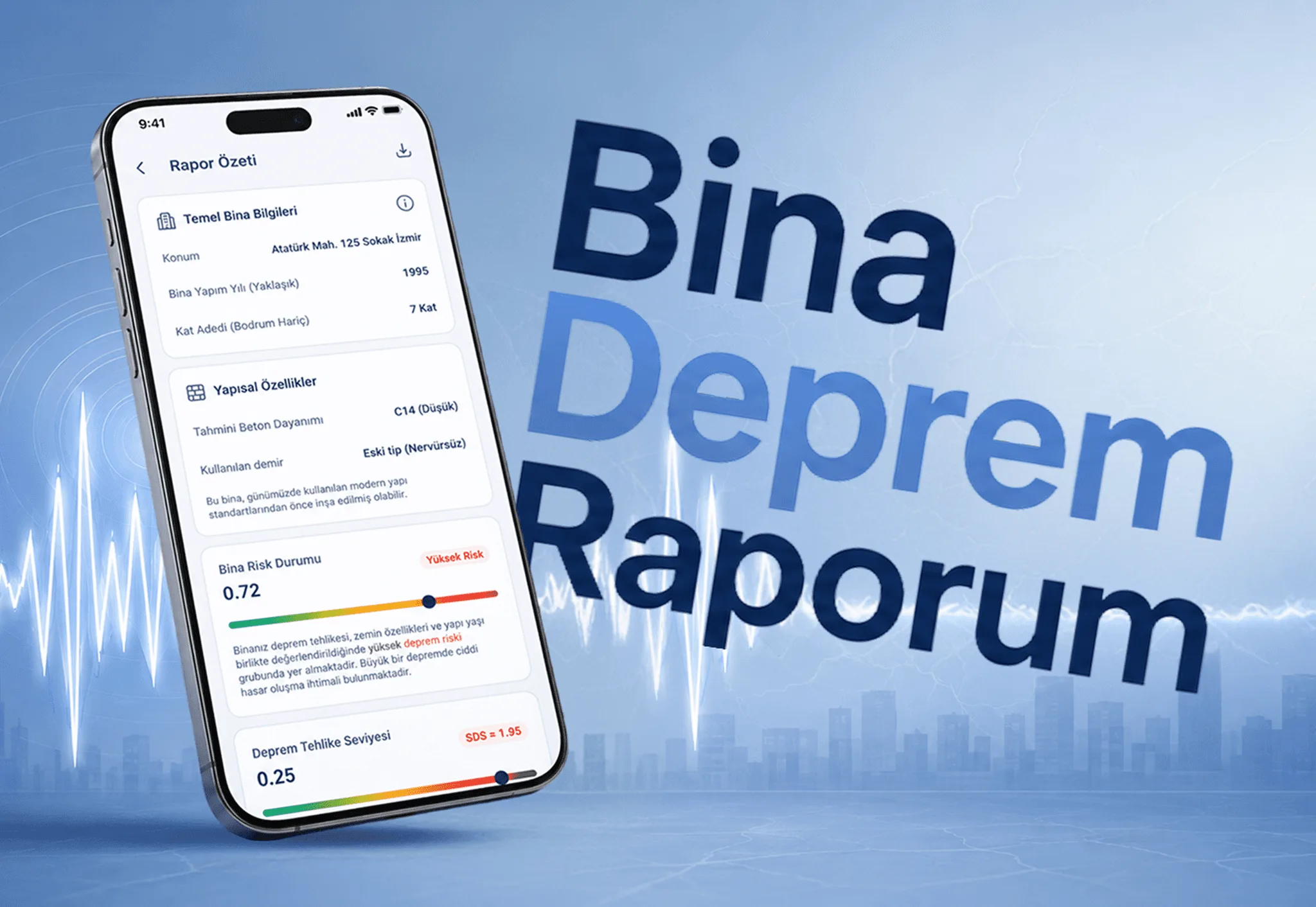
Bina Deprem Raporum is a building risk report app we built so homeowners can understand their home’s earthquake risk without technical expertise. We designed and developed it from the ground up for our client İsmail Taygun Kır. The project took three months, and the app went live on the App Store on July 2, 2026.
The core structure of the app looks like this:
Two-tier service: The free tier automatically generates a PDF risk report instantly. In the paid tier, users can upload photos and receive a detailed expert assessment delivered within 48 hours.
Admin panel: We designed an admin panel to manage incoming requests and reports.
Report verification: Generated reports can be verified with a QR code.
Notifications: Users receive notifications about the status of their report.
Earthquake tracking: Besides the building risk report, the app shows AFAD, Kandilli and EMSC records on a list and a map.
The goal of this structure is to let homeowners get a free first look without dealing with technical terms, and move to the second tier only if they want a deeper assessment. That leaves no barrier to trying the app.
There is an important boundary here. Bina Deprem Raporum is not an early warning app, and the report inside the app is for information only. An official “risky structure determination” in Turkey is a separate procedure under Law No. 6306, and the app’s report does not replace it. For the official process, see the Risky Structure Determination page on the Turkish e-Devlet portal. Stating a limit like this clearly inside the app and in the store listing guides users correctly and protects the credibility of the product.
You can find the full details on the Bina Deprem Raporum project page.
Technical Decisions in an Earthquake App
For tracking and notification apps, it is usually healthier to fetch data through your own server than to query the institution directly from every phone. The server cleans up records, reconciles differences between sources and sends notifications from one place. That way, users do not each send separate requests to the same institution, and when a source changes its format you only update the server. This separation also makes the app easier to maintain as it grows.
Plan how the app behaves on a weak connection too. Networks can become congested after an earthquake. Storing the last viewed list on the phone and showing when the data was last updated gives a better experience than an empty screen. For notifications, the delivery service and the user preferences (location, magnitude threshold) need to be designed from the start.
What to Watch For When Building an Earthquake App
On a sensitive subject like this, communication decisions matter as much as technical ones.
Limit what you promise. If your app does not offer prediction, early warning or official determination, say so clearly. Users can make decisions based on a false sense of security.
Show your sources. State which institution the earthquake data comes from and when it was last updated.
Keep the language simple. A user who opens the app in a crisis or while worried does not want complicated screens. Large text, clear colors and few steps are essential.
Protect personal data. Location, address and building photos are sensitive data. Explain in your privacy policy what you collect and why.
Use notifications with restraint. Sending an alert for every small earthquake pushes users to turn notifications off. Offer a threshold and a location preference.
Design for accessibility. People of every age open these apps. Think about text size, contrast and screen reader support from the start. In a crisis, only screens that work with one hand and in a short time are useful.
Test in real conditions. Trying the app only in a development environment is not enough. Check how it behaves on different phones, on a slow connection and with notification permission turned off. Confirm with real users that notifications arrive on time and the text is easy to understand.
Keep your sources up to date. Institutions can change their data format or access terms. Monitor your sources regularly and add checks so the app never shows empty or wrong data after an unexpected change.
The Earthquake App Development Process
Whatever the type, the process follows similar steps. First, write down which problem the product solves and which claims it will not make. Then plan a first release with a small scope. An MVP development approach helps here: it puts the core feature in front of users quickly, and you decide the next features based on feedback.
On the design side, the UI/UX design process matters especially for screens that will be used in stressful situations. On the development side, if you are targeting iOS and Android together, our mobile app development service covers those decisions as well.
After the first release, review the claims in the store listing, the screenshots and the in-app text. Any sentence that can be misread on a topic like earthquakes can give users the wrong expectation. Watch where real users get stuck and plan the second version around that.
Time and cost depend on the scope, the number of tiers, the admin panel and the integrations. Bina Deprem Raporum was completed in three months, but every project is different. To talk about your idea, get in touch with us.